What is campaign journey design?
Campaign journey design defines the triggers, branches, waits, channels, sequence and assets an agency needs to build for a client campaign.
It turns campaign logic into a production-ready plan before individual assets enter production. It answers one question: what should the agency build for the client, and how does it fit together?
Journey design does not own production workflow, technical QA, client comments, approval or sign-off. Those come later, and this page shows exactly where the line sits.
Why isn't a flowchart enough?
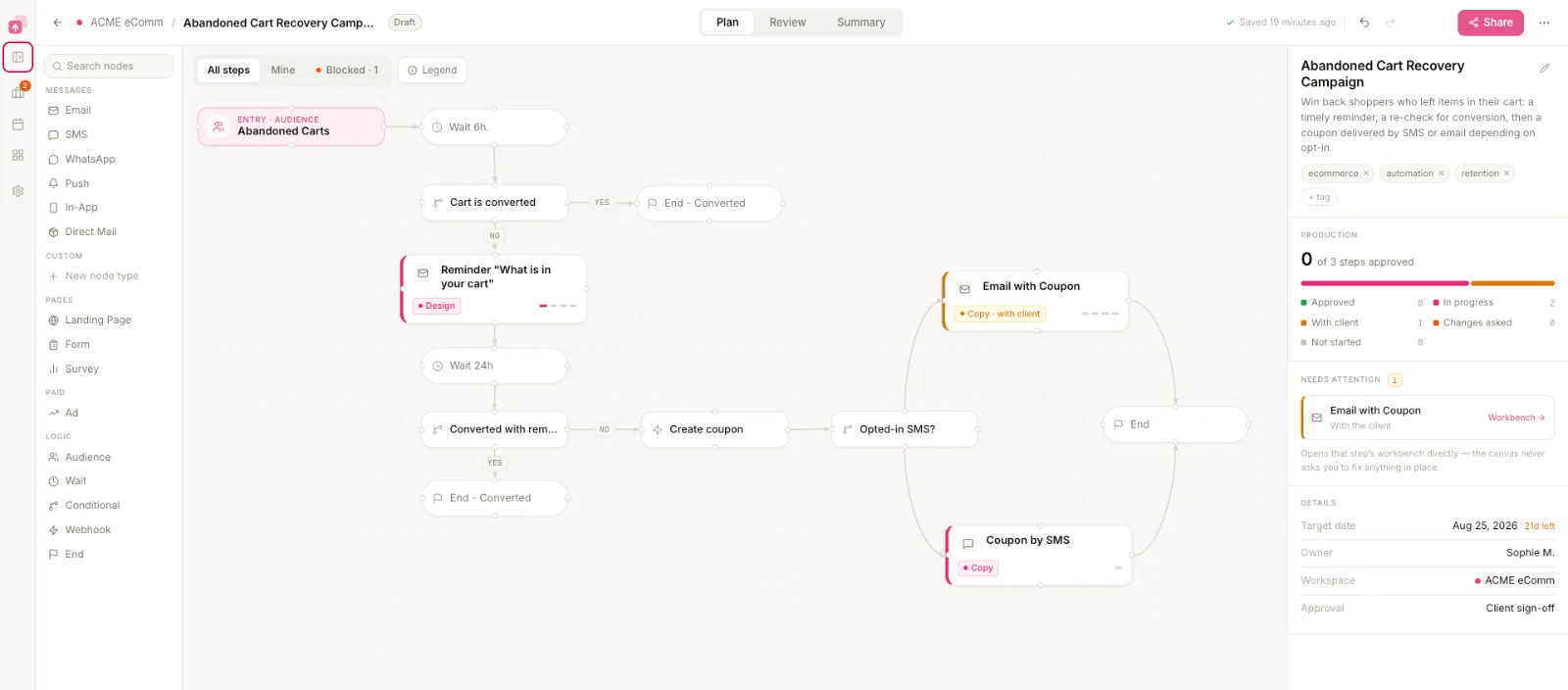
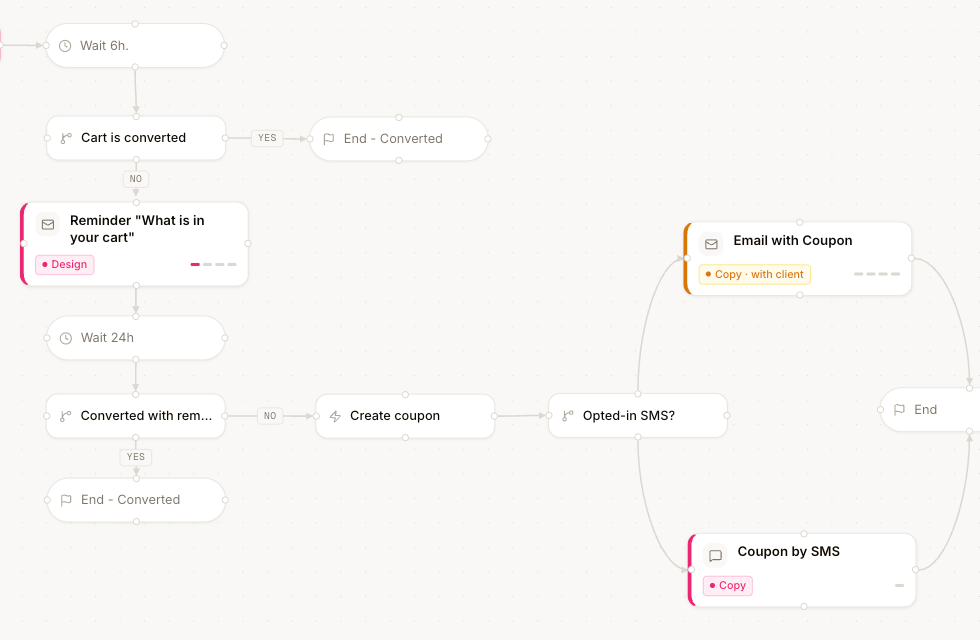
A flowchart records campaign logic; an operational journey also records what the agency has to produce.
Both describe the same campaign. Only one of them tells a producer what work exists, what channel it belongs to and what has to be ready before the client sees anything.
A campaign journey is not a picture of the campaign. It is the specification for everything the agency has to produce.
What does a designed campaign journey look like?
A designed journey shows the trigger, the order of steps, the waits between them, the conditions that split the path, and the channel of every interaction.
This is one client campaign on the visual campaign journey designer. Read it left to right: entry, message, wait, condition, then a separate path per branch.
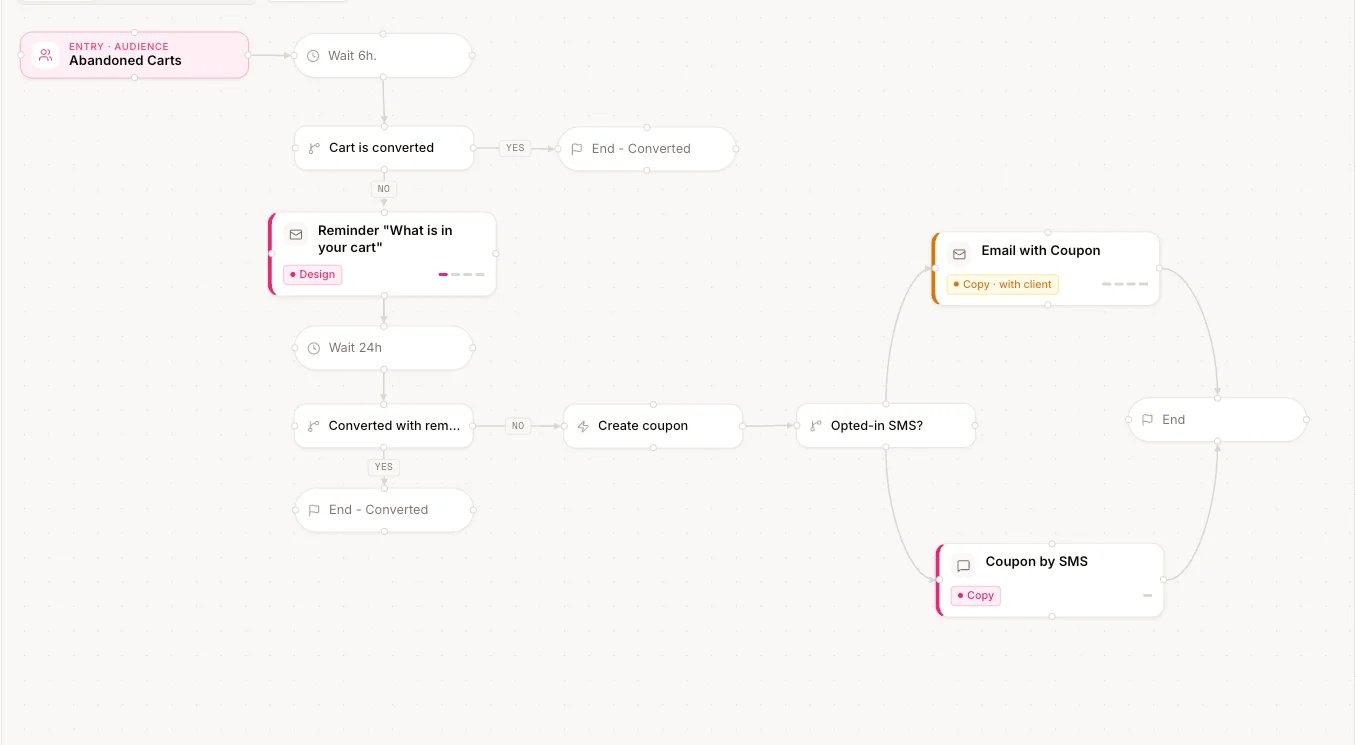
Each step on this canvas names a real deliverable: an email, an SMS, a landing page. The waits and conditions between them are the campaign logic the client’s platform will eventually execute.
One journey can create dozens of production requirements
Journey complexity turns into production work: every step, branch and channel adds something the agency has to write, design, build and check.
The counts below belong to this example campaign. They are not a benchmark, an average or a customer statistic.
| Channel | Example assets | Count |
|---|---|---|
| Email 01 Welcome, Email 02 Reminder, Email 03 Offer, plus branch variants | 14 | |
| SMS | SMS 01 Reminder, SMS 02 Last call, per market | 9 |
| Template messages for the reminder path | 5 | |
| Landing page | Offer page and its variants | 6 |
| Ad | Retargeting creative sized per placement | 8 |
| Total | Every one of them needs an owner, a state and a version | 42 |
The number is not the point. The point is that a journey decides the size of the production job before anyone opens a design file.
Keep the journey connected to its required assets
Every campaign step should connect to the asset the agency has to produce.
When the connection breaks, the journey becomes a document nobody updates and the asset list becomes a spreadsheet nobody trusts. Keep them attached and a change to the sequence is visible in the work.
Asset records start empty. Journey design names them and states what each one has to do. Production fills them in.
How does journey design hand off to campaign production?
Journey design ends when the campaign's required assets are named and specified; campaign production begins when someone is accountable for building each one.
Five stages, five different owners. Journey design owns the first one only.
Two boundaries matter. Proofing produces changes; approval records a decision. Zero open comments is not an approval, and the client is never responsible for technical QA.
What does campaign journey design have to specify?
Campaign journey design specifies the triggers, branches, waits, channels, sequence and assets an agency needs to produce for a client campaign.
Trigger
What starts the campaign or journey for one person.
Sequence
What happens, and in what order.
Branches
Which conditions create different paths, and what each path contains.
Waits
How much time separates campaign steps.
Channels
Where each interaction happens.
Required assets
What the agency must actually produce to execute the journey, named one by one.
A producer can read it and start work without asking a single question.
Campaign journey design is not customer journey mapping
Campaign journey design defines an executable campaign; customer journey mapping describes a broader customer experience.
Both are useful, and agencies often do both. They produce different artifacts and lead to different next steps.
| Campaign journey design | Customer journey mapping |
|---|---|
| Defines an executable campaign | Describes a broader customer experience |
| Includes triggers and sequences | Describes stages and interactions |
| Specifies channels | Maps touchpoints |
| Defines required campaign assets | Identifies experience opportunities |
| Leads into campaign production | Often leads into strategy or research |
A journey map can inform a campaign journey. It cannot replace it, because it does not name the assets the agency has to produce.
Why do agencies skip journey design?
Because the campaign architecture already exists in fragments, and each fragment feels like enough.
The client brief lists deliverables. The sending platform holds the logic. The project tool holds the tasks. Nobody wrote the journey down, because three tools each hold a third of it.
No single view shows both what the client campaign is supposed to do and every asset the agency has to produce.
So scope arrives late. An extra branch discovered in week three is four more assets nobody quoted, and the client hears about the delay before the agency has a plan for it.
Does LaunchSign replace the client's sending platform?
No. LaunchSign coordinates journey design, campaign production, proofing and approval before signed-off work moves into the platform the client already uses to build and send campaigns.
Two systems, one handoff. The work crosses over when it has been signed off, and a person carries it across.
Who does campaign journey design help?
The agency roles who have to agree on what the campaign is before anyone starts producing it.
| Agency role | What journey design gives them |
|---|---|
| CRM / lifecycle lead | One view of campaign logic and channel sequence, before it is scattered across platform screens. |
| Campaign producer | A clear inventory of what needs to be produced, per channel, per branch. |
| Project manager | Visibility into scope before production starts, so the plan matches the asset count. |
| Account manager | A shared representation of what the agency is building for the client, to review before production. |
Client stakeholders see the journey as external reviewers. They are never responsible for technical QA.
Campaign journey design FAQ
What is campaign journey design?
Campaign journey design defines the triggers, branches, waits, channels, sequence and required assets of a client campaign, before individual assets enter production.
What should a campaign journey include?
Six things: the trigger that starts it, the sequence of steps, the conditions that branch it, the waits between steps, the channel of every interaction, and the assets the agency has to produce.
Is campaign journey design the same as customer journey mapping?
No. Campaign journey design defines an executable campaign and names the assets required to build it. Customer journey mapping describes a broader customer experience across stages and touchpoints.
What happens after the campaign journey is designed?
Required assets move into campaign production management, where owners, stages, blockers, deadlines and QA are managed. Proofing and approval come after that.
Does LaunchSign send campaigns?
No. Signed-off work moves to the sending platform the client already uses to build, schedule and send campaigns.
Related campaign journey design reading
All articles →Start with a campaign journey blueprint
Structured journeys for common client programs: the trigger, the sequence, the waits, the branches and the assets each one requires. Use one as the starting point for the next client campaign instead of an empty canvas.
Get the journey blueprint library →